
Legacy View
Chandler SystemsHouse & Home
4.6159.00 Reviews
- Version
- 6.18.2
- Installs
- 50.00K
- Age Rating
- Everyone
Screenshots
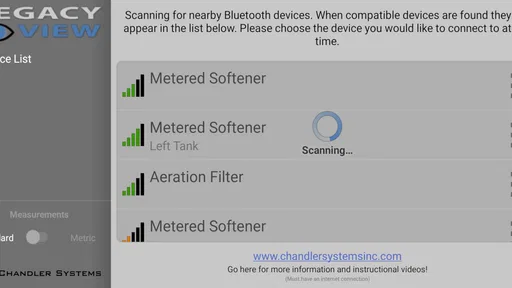
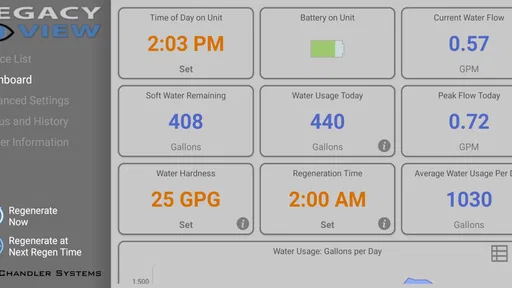
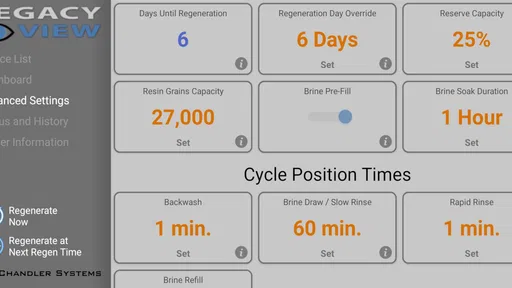
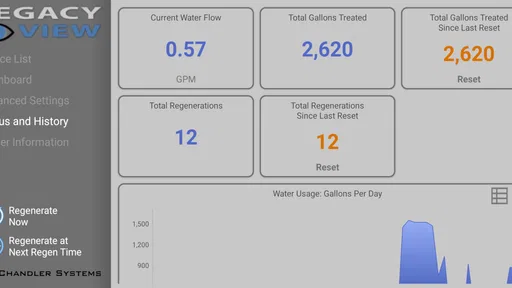
Our Review of Legacy View
 Analysis by Appyee
Managing a water treatment system is usually something I only think about when the water feels different, a warning appears, or a service task is overdue. Legacy View makes that routine less dependent on guesswork by putting information and control for a Chandler Systems water treatment system on a phone. I found it most useful as a practical companion to the equipment already installed at home, rather than as a general smart-home dashboard.
That distinction matters. This is a focused House & Home app, not a replacement for the treatment hardware and not a universal tool for every brand of softener or filtration system. If your home uses a compatible Chandler Systems setup, it can give you a more convenient way to check what is happening and interact with the system. If you are looking for broad water-quality education, shopping advice, or control over unrelated appliances, this is probably the wrong place to start.
I also like that the app is free and rated for Everyone, which makes it approachable for a household where more than one person may need to check the system. Chandler Systems has maintained it through a long product life: it was released on October 20, 2015, and the current version is 6.18.2. That history is reflected in the overall impression: Legacy View feels like a utility built around dependable access to an installed system, not an app trying to entertain you.
How I use Legacy View in a normal household routine
My baseline workflow is deliberately simple. I open the app when I want to understand the current condition of the treatment system, review the information it presents, and use the available controls only when I know what change I intend to make. That last part is important. Water treatment settings affect a real household process, so tapping through menus just to see what happens is not a habit I recommend.
The best everyday scenario is a busy home where the equipment is located in a basement, utility room, garage, or another place nobody visits casually. Instead of walking to the unit whenever I want to check it, I can begin with the phone. This is especially convenient before a weekend away, after returning from travel, or when another family member asks whether the system needs attention.
I would not treat the screen as a substitute for looking at the physical equipment when something seems wrong. A phone view can help me notice information and make a planned adjustment, but it cannot remove the need to check obvious real-world issues such as power, plumbing, salt or filter-related supplies, leaks, or unusual sounds. The useful habit is to use Legacy View as the first check, then inspect the installation if the information and the physical situation do not match.
For a household with shared responsibility, the app can also make handoffs easier. Rather than relying on a vague message such as “the water system may need checking,” one person can review the available status information and tell the next person exactly what prompted the concern. That is a small benefit, but it reduces the common problem of several people changing settings without knowing what the previous person did.
One of my practical tips is to decide what you are checking before opening the app. Is the goal to confirm normal operation, review a setting, or respond to a specific symptom? This keeps the session focused and makes it less likely that a user will alter a value accidentally. I also prefer recording any intentional change in a household note, especially when more than one person manages the equipment. The app provides access; a simple shared habit provides continuity.
What the app is really good at
Legacy View’s strength is proximity to the system’s own information. A conventional alternative is to walk to the treatment unit and read its local controls. That remains useful, but a phone-based view is more convenient when the equipment is out of sight or when I am already handling another household task. Another alternative is to call a service professional for every question. That is appropriate for repairs and uncertain problems, but excessive for routine checks that I can safely review myself.
The app also sits between two extremes. It is more direct than searching the internet for generic advice about water softeners, because the relevant information is connected to the installed Chandler Systems equipment. At the same time, it is less ambitious than a complete home automation platform. I would choose it for focused system awareness, not for bringing lighting, heating, security, and water treatment into one interface.
Its audience is therefore quite specific: owners or residents with a compatible Chandler Systems water treatment system who want information and control close at hand. Renters may find it useful if the equipment and access arrangement allow them to use it, but the person responsible for maintenance should agree on who is allowed to change settings. People without Chandler Systems equipment should skip the download rather than expecting it to identify or manage an unrelated installation.
Settings I would review before relying on it
Before making the app part of my routine, I would confirm that the correct water treatment system is connected and that the information shown corresponds to the equipment in the home. This sounds obvious, but it is the most important setup habit when an app is used by several people or when a phone has been passed to a new household member. A convenient control is only helpful when I know exactly which system it represents.
I would then spend time learning the layout without changing anything. The goal is to understand where information appears, where controls are located, and which screens require more deliberate action. This creates a useful mental map. When a real issue occurs, I am less likely to confuse a read-only status view with a setting that changes system behavior.
Another worthwhile check is the app’s compatibility with the phone being used. Legacy View requires Android 6.0 or later, so an older Android device may not be suitable even if the household equipment is compatible. On iOS or Android, I would keep the app updated through the normal store process, because version changes can affect the way a connected utility behaves. The current release is 6.18.2, and I would use that as the starting point rather than relying on an old installation copied from another device.
I would also agree on a conservative permissions and access routine within the household. The person who only needs to check information does not necessarily need to make adjustments. If the app or system presents controls, I would reserve changes for someone who understands the treatment setup and knows when professional help is appropriate. This is not a criticism of the app; it is a sensible boundary for any tool that can influence a physical household system.
A useful advanced habit is to review settings after a service visit or equipment change. Do not assume that a familiar phone screen means the underlying installation is unchanged. Compare what the app shows with what the technician or household records indicate, then leave the system alone if everything lines up. If something is inconsistent, that is a reason to ask for clarification rather than experimenting with several values.
Faster patterns for experienced users
Once the basic workflow is familiar, I would use a repeatable checking pattern. First, open Legacy View for a quick information review. Second, decide whether the situation is normal, requires a physical inspection, or calls for professional assistance. Third, if a change is genuinely needed, make one deliberate adjustment and check the result later instead of making several changes at once.
This one-change approach is more valuable than it sounds. If I modify multiple settings together and the result is not what I expected, I lose the ability to identify which change mattered. A water treatment system is not an ideal place for trial and error. Experienced use is less about finding secret shortcuts and more about reducing unnecessary actions.
I also prefer checking at consistent moments rather than repeatedly opening the app throughout the day. A quick review after a noticeable change in water use, before travel, or when a household maintenance reminder comes up is easier to remember than an undefined promise to “check it sometime.” The app becomes part of a maintenance rhythm instead of another notification competing for attention.
For families, one person can handle routine observation while another handles settings. That division keeps the app useful to everyone without turning every household member into an accidental system administrator. If a concern is reported, the observer can describe what the app shows and whether anything changed, while the person responsible for maintenance decides on the next step.
There is also a practical troubleshooting shortcut: compare the app’s information with the physical symptoms before changing anything. If the water experience has changed but the app appears normal, inspect the equipment and the broader household situation. If the app indicates an issue but the water seems fine, avoid dismissing it simply because the immediate symptom is absent. The two sources answer different parts of the question, and the safest decision comes from considering both.
These habits are more useful than trying to make Legacy View behave like a broader smart-home platform. Its value comes from being close to one specific job. I would rather have a focused tool that helps me check the Chandler Systems equipment than a crowded dashboard where the treatment system is buried among unrelated controls.
Where the app reaches its limits
The main limitation is its narrow purpose. Legacy View is not a general diagnostic service, a replacement for a plumber, or a guarantee that every water problem can be solved from a phone. If the issue involves a leak, electrical fault, plumbing change, unusual noise, or a condition I cannot interpret confidently, I would stop using the app as a control surface and seek appropriate help.
It is also not the best choice for someone who wants a complete record of household water quality or a broad comparison of treatment products. The app is tied to information and control for a Chandler Systems water treatment system. A person still deciding what equipment to buy may get more value from a manufacturer-neutral guide, an installer, or an in-person assessment of the home’s water and plumbing needs.
Another trade-off is that convenience can encourage overconfidence. Seeing a system on a phone may make it feel as though every problem is software-related. In reality, connected access does not eliminate physical maintenance. I would keep the equipment’s normal care schedule, supplies, and service information available rather than assuming the app alone covers everything.
The long-running nature of the product is both reassuring and something to consider. The app has been around since 2015, and its current version shows ongoing maintenance, but users should still approach it as a practical utility rather than expecting the visual polish or broad integrations of a brand-new smart-home product. For me, clear access to the relevant system matters more than decorative design, but readers who want a highly unified home dashboard may find the focused approach limiting.
Privacy and account decisions should be handled thoughtfully as well. I would use the minimum access needed for the people managing the system and avoid sharing control casually. If a phone is replaced, sold, or handed to someone else, I would remove the old access through the normal device and account-management steps available to me. That is a general connected-device habit, but it matters more when an app can influence home equipment.
My verdict after building a repeatable habit
After using Legacy View as a companion rather than a magic fix, I see its appeal clearly. It gives owners of compatible Chandler Systems equipment a convenient way to stay informed and interact with the treatment system without always standing beside the unit. The free price lowers the barrier to trying it, and its Everyone age rating makes it suitable for ordinary household use, provided control is handled responsibly.
The app has earned a 4.6 average from around 1.2 thousand ratings, with over 50 thousand installs, which fits my impression that it serves a real and specific need. Those figures are not a reason to install it blindly, though. Compatibility with the household system is the deciding factor, followed by whether you actually want phone-based access instead of relying on the local controls.
I would recommend it to a Chandler Systems owner who wants faster routine checks, clearer handoffs between household members, and a convenient starting point when something about the water treatment setup needs attention. I would especially recommend establishing the one-change-at-a-time habit and comparing app information with the physical equipment before making adjustments.
I would skip it if I do not have a compatible Chandler Systems installation, if I want a universal smart-home controller, or if I expect an app to replace inspection and professional service. For those users, a different tool or a direct conversation with an installer will be more appropriate.
For the right home, Legacy View is at its best when it becomes a quiet maintenance aid: open it with a purpose, review the system, make only informed changes, and leave complicated problems to someone qualified. That is not flashy, but it is exactly why I would keep it on my phone when my household relies on Chandler Systems water treatment equipment.
Verdict
Strengths of Legacy View
- Simple interface makes browsing legacy content quick and straightforward.
- Useful for users who need access to older or archived information.
- Lightweight design should work well on many older devices.
- Content is presented in a focused layout with minimal distractions.
- Can be convenient for preserving access to material from previous versions.
Limitations of Legacy View
- Its usefulness depends heavily on the quality and availability of archived content.
- The dated focus may feel limited compared with modern alternatives.
- Some pages or features may not display correctly on newer devices.
- Navigation can feel basic for users expecting advanced search tools.
- Updates and long-term support may be difficult to assess.
Similar Picks in This Category
View All
Universal TV Remote Control
CodeMatics Media Solutions3.9

AlfredCamera Home Security app
Alfred Systems Inc.4.7

Planner 5D: AI Home Design
Planner 5D4.5

Universal Tv Remote-Cast to TV
One Music Player4.1

Zillow: Homes for Sale & Rent
Zillow Group4.8

99acres Buy/Rent/Sell Property
infoedge.com4.3
Frequently Asked Questions
What is Legacy View, and what can I use it for?
Legacy View is designed to give users access to older or legacy-style content and functionality in a more convenient mobile format. Depending on the version and platform, it may help you browse information, review records, or interact with features that are not available in newer interfaces. Before downloading, check the app description carefully to confirm that its tools match your specific needs.
Is Legacy View free to download and use?
Legacy View may be available as a free download, but the exact cost structure can vary between Android and iOS. Some features may require an account, a subscription, or access provided by an associated service. I recommend checking the store listing for current pricing, in-app purchases, and regional restrictions before installing, since these details can change with future updates.
Does Legacy View require an internet connection?
Most legacy-viewing applications depend on an internet connection to load current data, synchronize information, or communicate with a related online service. Certain previously loaded content may remain accessible offline, but you should not assume that every function will work without connectivity. A stable Wi-Fi or mobile-data connection is recommended, especially during setup, login, and synchronization.
Is Legacy View compatible with my Android or iPhone?
Compatibility depends on your device model, operating-system version, and the specific release of Legacy View available in your region. Before downloading, open the official Google Play or Apple App Store listing and review the stated requirements. Older phones may experience slower performance, missing features, or installation limitations if they no longer meet the application’s technical requirements.
Is Legacy View safe to install and use?
The safest way to obtain Legacy View is through its official Google Play or Apple App Store listing rather than an unofficial APK or third-party download page. Before installation, review the developer name, permissions, privacy policy, update history, and user feedback. Avoid granting unnecessary access, and keep both the app and your device operating system updated for better security.
